The actual kit that went around the world in the World in Six Strings footage. Sixteen months, twelve locations, about $900 all in.

The year was 1996, and Kenneth "Babyface" Edmonds was the "it" producer. He had produced the Revelations record for Wynonna Judd, and Eric Clapton did a cover version of the tune for the soundtrack of the movie Phenomenon starring John Travolta.
This was my sophomore year at Music Sales, and I was recently promoted to senior music editor. And my task was to set up a small but powerful studio in our office space. I was given a $35,000 budget and an ominous warning by my boss, "This is a good opportunity for you, don't f**k it up."
Excited but nervous, I set my mind to the task. So, as I prepared for my train ride home, I reached into my black leather knapsack, grabbed my Sony CD Walkman, selected a CD out of my CD wallet, pressed play, and folded the latest copy of Mix magazine into my hand. As I thumbed through the magazine, I stopped at one of the feature articles, Babyface's home studio setup. The heaven's opened, a choir of angels sang, and I now had a blueprint for spending $35K of someone else's money.
Now, I could go into the adventure of the trials and tribulations of setting up the Music Sales studio, but that's beyond the scope of this article. The focus of this article is the four main questions that I needed to address and what I learned because, a few years after setting up the Music Sales studio, I knew what to do to set up my own home studio.
Please understand that this is a brief overview, and I'm glossing over topics that could fill an entire book. My goal is to simplify the building of a home studio while encouraging you to learn the art of recording.
Also, as a bonus, I'm adding two of my curated lists: "32 Recording Terms That You Should Know" and "Producer/Engineer Lingo." Grab a beverage and a comfy seat. Enjoy!
Home recording is fun and every musician's dream. Imagine putting down your musical ideas and creating an album. But, the learning curve necessary to become a producer/engineer is nearly as much effort as it is to learn an instrument in the first place. My goal is to speed up that process by sharing my experience with you.

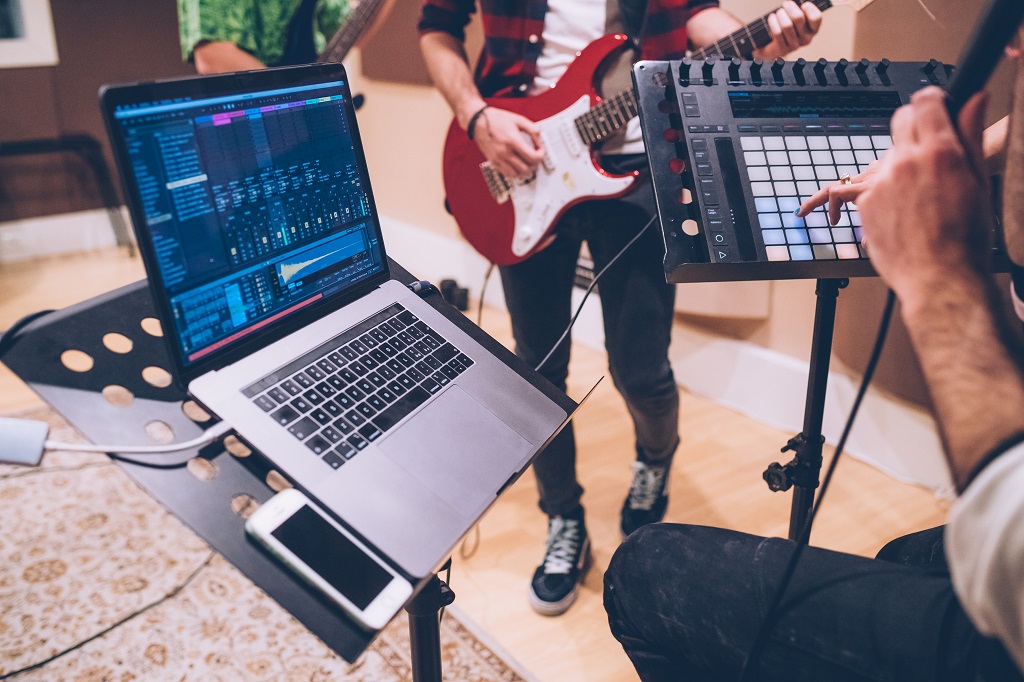
Today's technology is impressive, and your laptop and/or cellphone have more processing power than The Beatles had when they recorded Sgt. Pepper's Lonely Hearts Club Band. But, you're going to need more than a laptop and a cellphone. So first, let's break down the elements necessary in the recording process:
You already have the sound source if you're a musician, and you probably already own a computer. So, all that's left is the DAW, audio interface, and headphones.
Fortunately, there are bundles that you can purchase for a few hundred dollars that include the interface, headphones, and a mic. That leaves the DAW, and most companies offer free or lite versions of their product to get you started.
Now that you know what you need, you probably have a question or two about the recording process. So, let's move forward.

Most people are a little overwhelmed as they enter the world of recording. The fear is that home recording is complicated, and the more significant worry is that you won't be able to do it. But, the process doesn't have to be complex, and, just like you learned how to play your instrument, you'll learn to record and produce.
Most home recording artists are multi-trackers, and they record one track at a time. But, before we get into that, we need to know how to…
As I told you in my story above, I dove into the deep end of the pool and spent many months putting together the Music Sales Studio. For months, I spent all of my free time reading manuals.
My boss would mosey by the studio and gaze through the window to see what I was doing. And, once a week, he'd query, "When's the studio gonna be ready?" It was nerve-racking, to say the least.
This doesn't have to be your experience. You could start out easy and grow into your system until you outgrow your system, and then you can upgrade. You can always sell your used gear to help offset the cost of newer and more powerful equipment.
But, before you can make this choice, you need to…

Determine Your Studio Needs:
When Springsteen recorded the double album, The River (1980), he created about 60 song demos in the recording studio before finding the 20 that worked for the album.
He had spent so much money that he decided to use a four-track cassette tape recorder to create his demos for Nebraska (1982). And, he likes those demos so much, Bruce used them as the master. He used an iPhone for his latest release, Letter to You (2020).
For most home recording artists, their weakest skill is engineering know-how. I recommend buying gear that fits your budget and not upgrading until you outgrow it. But first, ask yourself the following two questions:
Your skills as an engineer are more important to the end result of your project than that $4000 mic preamp with all of those pretty lights.
Your home studio is centered around two pieces of hardware: your computer and your audio interface. Next is the DAW that you choose. So, I recommend doing your homework, reading articles and talking to friends who have experience.
When I started computer-based recording, I was at work, and my boss used Cubase. So, I used Cubase, and, although it was buggy—and what DAW wasn't in the late 90s—I began to learn the basics.
Then, I set up the Music Sales Studio, and the President of the company wanted Pro Tools. So, I purchased Pro Tools for the company and began the manual deep dive and the learning curve.
In 2002, Apple announced that it acquired eMagic, the predecessor to Logic Pro and in 2004, Apple released GarageBand. And GarageBand came bundled with the purchase of a new computer. So, I jumped on the GarageBand/Logic train because configuring the computer to work with the hardware and the DAW was a nightmare.
My hope was that Logic, being an Apple product, would play nice with the Apple computer, and, in 2007, Apple released Logic Studio, and it's been very consistent, and I'm happy with it. But I've also grown with it.
Today, getting started is much easier, and the troubleshooting aspect has diminished significantly.
But, there's no shortcut. You need to do your research. Most modern computers will do the job so there's nothing more that I can help you with here. Logic is out of the question if you're a Windows user. But, there are many other options. Here's a series of articles that we've put together to help you with your choice.


Every industry has its own terminology, lingo, jargon, parlance, etc. And, we enjoy being on the inside and sounding experienced and important. But, not knowing the industry-slang can help you feel like an outsider.
So, I set up some terms that will become second nature as you venture into the world of recording. Here are 32 terms that you should know. Some have been repeated from the above sections but I added them here to keep the terms together.
This is the computer software program used to record, edit, and produce audio. Everything from music to audio books, radio, and podcasts to the sound used in television to Youtube videos can be recorded in a DAW. Examples of DAWS are Pro Tools, Logic Pro, Cubase, Ableton, Reason, FL Studio, etc.
After the computer, this is the main piece of gear in the modern recording system that handles the process of grabbing analog audio signals and converting them to the digital format so that they can be further manipulated in the computer.
The audio interface also converts the digital information into analog audio signals that can be played back.
Musical Instrument Digital Interface is a technical standard that allows musical instruments and audio-related gear to communicate with the computer using a 5-pin midi cable or a USB cable.
This protocol does not transmit sound. Instead, midi sends digital information that can trigger sounds in your computer.
The time that it takes for an audio signal to travel through the entire recording system.
The amount of time allowed for a computer to process all of the audio that's going on. If you have many tracks, you may need to increase the buffer size to properly hear the playback.
Lower buffer size allows the latency to be shorter, and a higher buffer size increases the latency. The rule of thumb here is to use a lower buffer size while recording and increase the buffer size after recording when editing, mixing and mastering.
Channel is the part of the recording console or mixer that can process audio signals. And track refers to a recorded audio stream. But, some producers, engineers, and musicians will use these terms interchangeably. Just be aware that there is a clear distinction.
This is a form of audio distortion that happens when a signal exceeds the maximum limit of the digital recording system. As guitar players, we use distortion and very different levels and types of distortion.
But, in the digital recording process, any distortion is terrible and quite unpleasant sounding. The rule of thumb here is to record the cleanest signal possible without exceeding the system's limit. For guitar players, we can add distortion after the fact.
The amount of signal level available in a system before unwanted distortion is added. Headroom amount is measured in decibels (dB). For example, 0 dB is the maximum loudness level of most recording systems.
So, if you're recording your guitar and your signal coming into the system registers at -20 dB, then you have -20 dB of headroom before you start clipping. When you begin recording, you always want to have headroom, and you should be aware of what that headroom is.
This unit of measurement is used to determine the amount of loudness or volume. For example, a quiet room could be measured at 20-25 dB, a busy street is about 60 dB, and a rock concert could be at 120 dB.
Also, it's important to note that the threshold of pain is about 120 dB. 120 dB is where we begin to do damage to our hearing.
The loud and soft points of a sound recording over time. The higher the range, the more difference between the loudest and the softest points. For example, a classical orchestra has a wide dynamic range, whereas a rock or metal tune is loud and has less dynamic range or a lower dynamic range.
Gain is synonymous with volume. As guitar players, we're used to turning up the gain on our amps to get more crunch or wanted distortion. But, in recording, gain is volume.
The process of making sure that you're recording the signal level at an appropriate volume level. You don't want to record at too low a volume that the signal can't be heard, and you don't want to record at a higher volume where the signal begins to clip.
A preamp amplifies a weak signal and transmits it for recording or further processing. For example, a microphone or your guitar's pickup. So, you pluck the guitar string, and the string vibrations are 'picked up by the guitar's pickups.
The pickup magnets turn the vibrations into an electrical impulse that travels through your guitar cable into the amp.
The guitar amp's preamp further processes the signal with distortion and EQ before traveling into the power amp stage that increases the volume and shoots the signal out through the speaker.
The microphone is much simpler. The preamp boosts the signal captured by the microphone as it enters the recording system environment.
A piece of software used inside a DAW that processes the sound of a recording. This is actually the fun part. Plugins are like guitar FX pedals. Many different companies produce several versions of every type of effect that you can imagine.
And choosing plugins is like choosing your guitar pedals; some you need to have and others you want to have. And, so, the collecting process begins.
Signal processing is modifying a sound. There are a variety of ways that you can do this. In the virtual world, DSP is Digital Signal Processing. And, DSP means modifying the sound using a computer running algorithms that make changes to the audio signal.
Basically, plugins alter the sound and run algorithms to change the audio signal. The beauty is that the plugins do all of the work. We just make the choices.
The unprocessed sound or the sound of the recorded sound as you recorded it.
The amount of signal that is processed.
This is the part of the channel used to control the channel's volume. The fader is the slider on a mixing console that controls the volume from zero to max. You use the faders to create a blend of the instruments. This blend is called the mix.
The pan pot or the panoramic potentiometer controls where you want to place the sound in the mix. You can set the sound either in the left speaker, the right speaker, or somewhere in between.
This is a way to route a duplicate or clone signal so that it can be processed without affecting the original signal.
Here's how it works: you take the original channel and send it to another channel to be processed. The original channel stays in tact. Many producers like blending the dry and wet signals to get the desired sound that they're looking for.
This is the linear representation of the song's arrangement in the DAW. Computers allow us to see a timeline. In the analog domain, I would keep a legal pad and write the timestamps of the song's arrangement so that I quickly fast forward and rewind to the proper location.
This reminds me of the old cassette machines. These are the main control functions required for recording: play, record, rewind, fast forward, stop, etc. The transport is usually located on top or sometimes in a floating window in a DAW.
This stands for Beats Per Minute and defines the tempo of a song.
The 'mute' button prevents all of the sounds from that channel from being heard.
The 'solo' button mutes all of the other channels from playing so that only the sound from the channel selected can be heard.
This plays the section of the recording that's selected continuously (or in a cycle or loop).
This is the path that the signal travels from the input of a system to the output. This is important to understand because it can get really complicated in a short amount of time.
You need to be able to follow the signal flow from the input into the audio interface through the DAW and any sends, plugins, outboard gear, etc. Signal Flow is the entire process in and out of our recording system.
This is a single recorded performance. And takes are multiple recordings of the same part.
This is a series of takes edited together to create the illusion of one singular performance. Computer recording has made this so easy to do nowadays.
Here's how to do this: you can cycle a section and record it multiple times. Then, in the editing process, you choose the best parts from each take to create one seamless take.
All of the other channels flow into the main channel in a multi-track recording. This main channel is called the mix or the master output. It's also the Left and Right channels of the mix.
A digital file saves all of the DAW information associated with a multi-track recording, i.e., track names, track colors, song arrangement, plugins and plugin settings, audio and editing modifications, etc.So, everything gets saved into a folder sandwich, and one of the files in that sandwich is the Project or Session file.
The process where your DAW converts your project into a file on your hard drive. This usually represents the final mix of your song. This is the last sound file that you would listen to. There are many audio formats that you can bounce your final mix to. Here are two of the most popular:
Describing sound is as difficult as describing smell. But, when working with other musicians and/or producers/engineers, you need to be able to communicate effectively. Although most of these terms can be open to interpretation, many have become industry standard.
Here are 30 terms that I’ve heard while sitting in the producer’s chair. I also threw in a couple of you-wouldn’t-believe-what-I-heard-today terms that I now use to sniff out posers and wannabes.
Building your first home studio can be an overwhelming experience. But, it doesn’t have to be. And, in many cases, home recording is extremely rewarding. So, before throwing down your hard-earned greenbacks, do some homework.
At the very least, ask yourself these 4 questions:
Also, bookmark this article or print it out and keep it by your computer. I kept a binder filled with cheat sheets as I learned the ropes.
Thanks for reading.
[optin-monster-inline slug="cm0dye3jd2cm5u4sy0cv"]
The actual kit that went around the world in the World in Six Strings footage. Sixteen months, twelve locations, about $900 all in.
Ever hit a G chord that feels bright and settled, then swap to G7, and suddenly it sounds a little…expectant? Like it’s leaning forward, waiting for the next page to turn. That “unsettled” sound is the whole point. G7 is a dominant seventh chord built from G (Root), B (Major 3rd), D (Perfect 5th), and […]
The first time I met B7, my hand froze. Four fingers, tight spacing, and one tiny mistake makes half the chord go dull. That is why I call B7 the Gateway Chord. It pushes your fingers to work as a team. You will hear it in Blues, Folk, Classic Rock, Jazz, and even acoustic metal […]