
The actual kit that went around the world in the World in Six Strings footage. Sixteen months, twelve locations, about $900 all in.
Transcribing is often considered a lost art among guitar players, who were never the most 'theory-oriented' musicians. Yet, in one form or another, transcribing is an inevitable part of a player's journey as they level up - as they say, some learn from the tabs or sheet music, others write them!
If you belong to the second group or aspire to get there, I will list the best guitar transcription software to help you first figure out the parts by ear and then notate them as quickly as possible.
All my choices are guitar player-focused, as I know that most of you are not sheet music lovers, nor have you gone to music school.
Since tech never stops and musicians generally struggle to catch up, I've added the latest updates of each software, the free version you can use, and the now unavoidable AI alternatives.
| Best Free Notation Assistant | Transcribe! | Very reliable audio editor
Free and easy to use |
| Best Practice Tool | Riff Station | Free and lightweight
Accurate chord finder and audio analyzer for isolating guitar parts |
| Best Overall Free Notation Software | MuseScore | Forever free
Friendly Interface & Community |
| For The Guitar Player/ Producer | Dorico | Best audio playback
Plugin Friendly |
| For Casual Transcriber | TuxGuitar | Best home surround sound
Best value for its versatility |
| For Guitarists of all Levels | Guitar Pro 8 | Most tablature-friendly interface
All-in-one software with built-in audio editor |
| Classical musicians & Orchestra Transcribers | Sibelius | Best for classical musicians or orchestra scorers
Packed with advanced features |
In the old days, writing sheet music was the only way to reproduce music. Transcription is still needed today; only the medium has changed from paper to screen, but few do it as it's complicated and time-consuming. If you get to it, though, the advantages are many.
Transcription is a multi-phase process that starts from actively listening to the song, figuring out the first details learning it note-per-note, and finally notating it. Thus, different software can help in different phases.
You need the first, while the second depends on how fast you pick up things by ear. Luckily, there are some software today that can do both.
You can transcribe guitar parts using different notation methods.
The first is the most complicated but most accurate; Tabs are easier but flawed in transcribing the rhythm and timing; Midi is limited to only being run on other software.
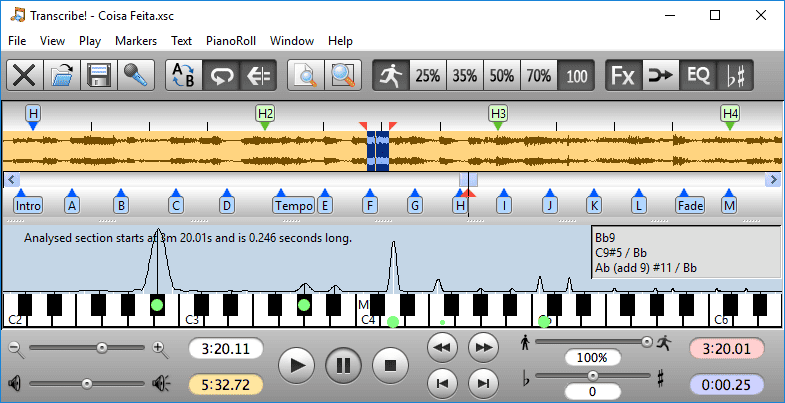
Transcribe!, as the name itself suggests, is very straightforward in what it does and has been around for a long time. It will not transcribe the part for you nor allow you to notate it, but it will massively help you figure out parts by ear.
Transcribe! is an audio editor that isolates, slows down, separates, and loops various parts of a recording. Unlike a DAW or general audio editing software, it offers a transcriber-friendly interface and focused functionalities.
Even though the interface looks outdated, as you can quickly tell just by scrolling through their site, all the basic functions are on point and keep improving yearly.

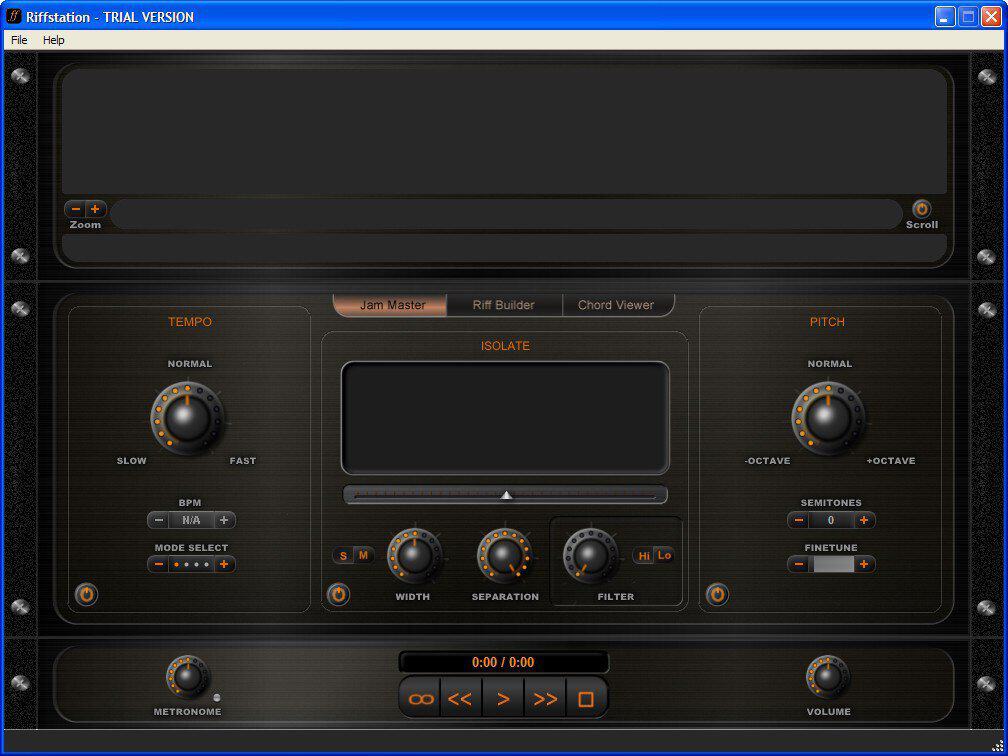
I discovered Riff Station when I was still a teenager learning guitar on YouTube from Marty Shwarts and dared myself to learn Metallica solo by ear.
It is not a typical software musicians use when transcribing, but it has the most straightforward guitar-focused interface that even amateurs who just started reading tabs will understand.
Like Transcribe!, Riff Station is a practice companion, not a notation software.
What I like the most is how impressive the chord finder is and how it holds up to newer software even though it has not been updated in years. The frequency scanner, metronome, and pitch shifter make it easy to focus on the guitar part.
The only things I wish for are if it was not only stand-alone but could also be used as a plugin in REAPER or Ableton or any DAWs and if it was available for mobile.

MuseScore is one the most popular free notation software for most modern musicians. You can download the software for free without hassle and start writing down scores or tablature.
As an open-source software, you can be sure it will be around for a long time and get updates frequently from anyone with skill and will.
Their community is beneficial in answering any questions, and the score-sharing feature will save you hours in transcribing as long as somebody else has done it before.
On the downside, the playback could be of better quality, and there have been problems with subscriptions and customer support, which are almost the norm with free software.
There is also a paid version with more features, but I would not go for it, considering there are better, even though costlier, software to spend money on.

Developed by the father of DAWs, Steinberg, Dorico is the perfect in-between of DAW and notation software. Itan excellenteat choice for musicians who are brand new to transcribing, especially when most guitarists are more familiar with a MIDI keyboard than a sheet score.
Its strongest parts are how easy the interface is, the short commands, and how it loads all the VSTs in your device to play back the notation - Dorico is king in audio playback and everything modern a transcriber needs.
On the other hand, it has fewer notation features than a giant like Sibelius, and it can be confusing if you come from the classical world where Sibelius is the default. However, you can get the same result with the much more affordable Dorico.

TuxGuitar can do much of what Guitar Pro can do for free. It will play the same files as Guitar Pro, serve the same functiand on, help you learn and notate the song, but with a less refined interface and a few lags.
It even has a free phone app whose purpose is to help you write down your riff ideas on the spot before you forget them. The app can be tedious, while the software is as simple and to the point as it gets.
Overall, TuxGuitar is an excellent choice for causal transcribers or those who only need the basic features and are okay with the outdated UI.

Guitar Pro is the safest, most reliable, and complete software to transcribe guitar parts. A few years ago, it was only a notation software where you could play back and write sheet/tablature - the latest version, though, incorporates a media player with all the functions you need to learn the part.
Simply put, you can do everything in Guitar Pro 8 without assistance. It also boasts an easy yet complete interface, arguably cause it's been on the guitarist screen for so long that it set a standard.
Guitar Pro can be as advanced as you want it to be. It's not cheap, but it will never fail you.

Sibelius is the royalty of music notation software made popular over decades by a plateau of classical musicians and institutions that made it an 'informal' industry standard - Much like Pro Tool in music production.
It's an expensive program, and it fits more classical guitarists or jazz musicians who look beyond transcribing only guitar. So if you lead one of those bands that play with sheet music or writer scores for orchestra as your main hustle besides guitar, Sibelius is your perfect software.
Depending on how big you want to go, you can choose your plan - I don't see though the use of a guitarist using more than the basic subscriptions. Be ready for an expensive start, and a simple out of which you can make a lot.

It's 2023, and there's no avoiding AI in music. Why use your ears when AI can write it down for you?
The answer is simple: they are not that good yet, and there's no point in transcribing unless you learn something about the song or music in general from it. They can, though, help save some time.
Everything in the AI realm is still experimental and continuously improving, so it's too early to go into details for each. Try them to see how far they can serve you. But remember, you still need to know what you are doing to tweak the errors, fill the gaps, and get a good final product.
Answer: Standard notation is superior to tabs as it contains all the musical information of the song. You can start by writing tabs, yet you would struggle to get the right note duration and rhythm.
It's always easier to turn notation, a.k.a sheet music, to tab than vice-versa.
Answer: Transcribing music and learning songs by ear is a process that takes consistent practice, some knowledge of music theory, and plenty of resilience. Everyone can do it if they keep practicing, even without perfect or a remarkable born relative pitch.
Answer: You don't need to be an expert in music theory to Transcribe guitar, but you need to be at least average in solfeggio. No complex knowledge of harmony is needed.

In short, not at all. In fact, the more the software does, the more carefully you need to understand whether the notations it came up with are on point. Sharp ears will never be replaced, so keep the ear practice going with the time the right software saves you.
Start by transcribing the easiest song you can think of that you learned in your first months of playing - the basics and process are the same whether it's a jazz standard or a three-chord pop song.

The actual kit that went around the world in the World in Six Strings footage. Sixteen months, twelve locations, about $900 all in.
Ever hit a G chord that feels bright and settled, then swap to G7, and suddenly it sounds a little…expectant? Like it’s leaning forward, waiting for the next page to turn. That “unsettled” sound is the whole point. G7 is a dominant seventh chord built from G (Root), B (Major 3rd), D (Perfect 5th), and […]
The first time I met B7, my hand froze. Four fingers, tight spacing, and one tiny mistake makes half the chord go dull. That is why I call B7 the Gateway Chord. It pushes your fingers to work as a team. You will hear it in Blues, Folk, Classic Rock, Jazz, and even acoustic metal […]